expr:class='"loading" + data:blog.mobileClass'>
Showing posts with label Tried It Tuesday. Show all posts

Tuesday, August 18, 2015

Tried it Tuesday {Glitter Stenciling}

Hi everyone! It's Time for Tried It Tuesday!
What have you tried at school or home?
If you've never linked up with Tried It Tuesday, just link up any idea school or home related and what worked or didn't work. Grab the button below. Simple!
My Tried It:
Glitter Stenciling
I am still trying to knock items off my to-do list before summer draws to a close. Many of you are back at school but we start officially after Labor Day. Maybe I can even get in a Monday Made It before the end of summer. I will be working on updating classroom curtains this week and making a curtain for under my daughter's loft bed. That brings me to this week's Tried It. My daughter is now 8 years old and her room needed an update. She wanted a more "mature" color on her walls. Sniff sniff. :( This is her room before.
So, I sanded the old stencils before repainting and patched some things.
I painted the walls in Glidden "Mushroom Cap" matte. Then, I bought a pint of Glidden "Bonjour Beige" in satin for the stenciling. It is just a shade darker than the wall color. I knew I wanted a glitter effect in the stenciling and bought this extra fine glitter at Walmart. 

 At first, I wasn't going to add the glitter directly to the paint but was going to try a put a glitter glaze over top of the stencil. However, I decided to try it. What was the worst that could happen? I poured a small amount of paint in a 1 cup measuring cup and started adding glitter.
I used about half of the bottle of glitter for about 1/3 cup paint. I had a lot of paint left over too from the measuring cup when I was done stenciling.
 Glitter mixed in paint:
 Stencils I bought. I only used the large one but may add small flowers later.
 My daughter helped out too! Here she is stenciling a flower with a stencil brush.
You don't need much paint on the brush.
 Here is a picture of her room. I am sewing a new curtain for under the loft bed. I will post pictures when that is done. :)
 Another view...
 Stencil up close with glitter
 Bedding is Paige Quilted bedding from Pottery Barn Kids.
 Rug is also from Pottery Barn Kids and has flecks of gold sparkle!
If my maintenance staff allows it, I would like to try some paint with glitter stenciling in the classroom! It was so easy and I love how it turned out! 


Tuesday, August 4, 2015

Tried It Tuesday {Compress PDF's}

Hi everyone! It's Time for Tried It Tuesday!
What have you tried at school or home?
If you've never linked up with Tried It Tuesday, just link up any idea school or home related and what worked or didn't work. Grab the button below. Simple!

My Tried It:
Compress PDF's (Free!)
Since I learned this trick, it has come in super handy! My PDF's always seem to be huge and TpT requires previews to be 5MB or less. I like to make displays in Power Point with pictures from the product and my previews were always so large. I had to limit the pages and pictures to keep it under 5MB. No more! I tried a couple different sites, and smallpdf was the easiest one I found that was successful with my large preview files. It's super easy to use!
This one was compressed from 30.89MB to 1.51MB!
This one was compressed from 11.95MB to 1007.69KB! That IS awesome and now my previews are a few pages filled with pictures. Love it! 

Don't forget about the Back to School sale at TpT that ends today! My store is 20% off and with the code BTS15, you can get an additional 8% off!
Also, check out my post from yesterday. There are links to THREE amazing giveaways happening right now! Click here!


Tuesday, July 28, 2015

Tried It Tuesday {Matching Font Color to Clipart in PowerPoint}

Hi everyone! It's Time for Tried It Tuesday!
What have you tried at school or home?
If you've never linked up with Tried It Tuesday, just link up any idea school or home related and what worked or didn't work. Grab the button below. Simple!

My Tried It:
Matching Font Color to Clipart in PowerPoint
You know when you have one of those "aha" moments when you learn a simple trick and CANNOT believe it took you this long to figure it out? That was me last week when I saw this tip on Instagram. For the life of me, I can't remember whose page it was from on my newsfeed but you are a lifesaver! I was working on a PowerPoint document and frustrated as usual trying to get just the right color on my font. I always would go to choose "more colors" and click around on that color wheel for what seemed like forever TRYING to match the color to my clipart!
Most of you probably know this but in case you don't (like me!), here is a simple little trick. I have a Mac and use PowerPoint 2008 for Mac.

I would love to hear any other tips you have about color matching on Macs. I read somewhere about an app under utilities but couldn't find that. There is so much to learn! Have a great week friends!


Tuesday, July 21, 2015

Tried It Tuesday {Writing in a Transparent Box}

Hi everyone! It's Time for Tried It Tuesday!
What have you tried at school or home?
If you've never linked up with Tried It Tuesday, just link up any idea school or home related and what worked or didn't work. Simple! 

My Tried It:
Writing in a Transparent Box
Last week, I blogged about how I am loving how products are using photographs more now in their cover pages and products. I wrote a tutorial about that here.
Here is a picture of one the cover pages I updated on my Fall Nonfiction Themed Text Practice.
A reader asked how I made those boxes transparent so I thought that would be a good topic to cover this week. You see these boxes all over product pages and Pinterest. I love how my friend Joanne at Head Over Heels for Teaching uses them all the time like these two examples.


Here are step by step pictures for you to try this technique! I used Power Point on my Mac.


I hope these steps help if you want to try this technique! I'll be back next week for another Tried It Tuesday. I'm always open to suggestions if there is something you would like to see for another Tried It!


Tuesday, July 14, 2015

Tried It Tuesday {Using Photos in Cover Pages} and Two For Tuesday!

Hi everyone! It's Time for Tried It Tuesday!
What have you tried at school or home?
If you've never linked up with Tried It Tuesday, just link up any idea school or home related and what worked or didn't work. Simple! 

My Tried It:
Using a Photo for Cover Page (PPT)
I love how products are using photographs more now in their cover pages and products.
So, after some tips from fellow bloggers at the TpT conference, I decided to update a couple covers. Everything has a learning curve and I wanted to share with you a couple things I learned in case you want to try this for yourself.

Where Do I Get Photos to Use?

One of the many awesome tips I learned from Ideas by Jivey's session at the TpT conference was how to search in Google for Public Domain images. Just click "labeled for reuse" under the search tools tab in images! Brilliant!

Matt from Digital: Divide and Conquer was also so helpful and pointed out some other sites he uses for free images including: 
So much sharing and collaboration happening this past weekend! Love it!

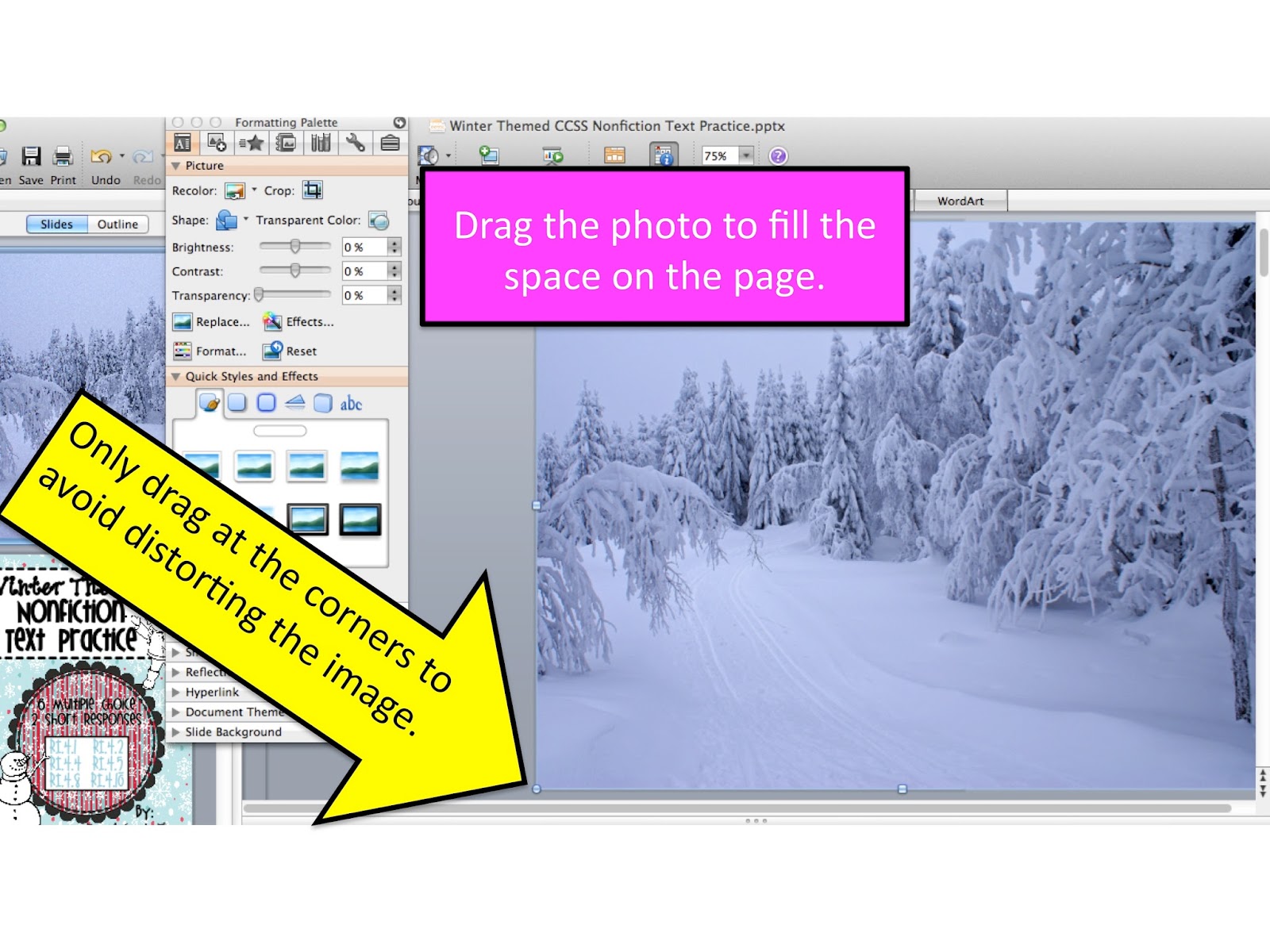
When you insert the image you find into PowerPoint, it will most likely not fit the page exactly. I found a way to make my images work without distorting the picture. With my directions I had to crop the photo, but this still worked out for me. I'm sure there are many other ways to do this, but I am just sharing what I figured out with trial and error. See the steps below accompanied by screen shots.


So, from old…to new cover!
While I was on a roll, I also updated this cover. Aren't the photos gorgeous?
Since updating these two covers, I decided to participate in Two For Tuesday with 
Today only these two products (winter and fall themed nonfiction texts) are both 50% off! 
They are each only $1.50 today! 
I have MORE of these in the making and when I eventually bundle them, you will get a discount if you already purchased some of them separately. I can look up any purchases by your TpT username.
Here is the preview of the winter themed nonfiction text product.

Here is a preview of the fall themed nonfiction text product.


What have you tried recently? I will have this link up open for only one week and a new Tried It Tuesday up next week! I'm going to do WEEKLY linkups over the summer (rest of July and August!).
Have a great week friends!